

WELCOME
Welcome Discount on Gaming PC
Shop any eligible Gaming PC and enjoy an exclusive welcome discount on your first order.
Use code:WELCOME
Shop now


Exclusive deals onpremium gaming PCs— Don't miss out!


Everything you need to play, upgrade and dominate.


Mixed RAM can sometimes work, but the system may lower speed, change channel behaviour or become unstable. Learn when mixing is acceptable and when a matched kit is safer.

Shopping for a gaming PC under AED 5,000 in the UAE? Learn which CPU, GPU, RAM, storage and cooling specifications matter—and what gaming performance is realistic.

Looking to buy RTX 5070 or RTX 5070 Ti in UAE? You’re in the right place. NVIDIA’s latest GeForce RTX 5070 series graphics cards deliver next-generation gaming performance with cutting-edge features like DLSS 4 and advanced ray tracing, all built on the new Blackwell architecture. In this comprehensive guide, we’ll explore the RTX 5070 vs 5070 Ti in detail – from specs and benchmarks (1080p, 1440p, 4K gaming) to thermal performance in UAE’s high ambient temperatures, ideal gaming PC builds, RTX 5070 price in UAE, and the best places to buy RTX 5070 in UAE. Our goal is to give UAE gamers and PC builders a professional, conversion-focused overview so you can make an informed purchase and elevate your gaming PC to the next level.
Next-Gen NVIDIA Blackwell GPUs: The RTX 5070 Ti and RTX 5070 are powered by NVIDIA’s Blackwell architecture, enabling high frame rates with DLSS 4, fourth-gen ray tracing cores, and AI-driven features for ultimate 1440p and 4K gaming Both cards bring game-changing performance and AI gaming enhancements like Multi Frame Generation and Ray Reconstruction for superior visuals
RTX 5070 Ti vs RTX 5070 – Performance & VRAM: The RTX 5070 Ti offers ~20–24% higher gaming performance than the RTX 5070 (especially at 1440p and 4K) and comes with 16GB VRAM vs 12GB on the 5070. This extra memory makes the 5070 Ti more future-proof for 4K gaming and heavy textures, whereas 12GB on the RTX 5070 can be a limit in some 4K scenarios. Both GPUs excel at 1440p gaming; the 5070 Ti can push higher frames or settings thanks to its additional horsepower and VRAM.
Thermals & Cooling for UAE Climate: With 250–300W TGP ratings, these GPUs run hot under load. The RTX 5070 Ti can hit ~88°C and the RTX 5070 ~85°C at max in standard conditions. In the UAE’s high ambient temperatures, proper case airflow and robust RTX 5070 cooling solutions (e.g. triple-fan aftermarket cards) are essential to prevent thermal throttling. Opt for cases with good ventilation, consider liquid cooling for your CPU, and ensure air-conditioned environment for stable performance during Dubai’s scorching summers.
Ideal Gaming PC Builds: Pair the RTX 5070 with a strong mid/high-end CPU (e.g. Intel Core i5-13600K or Ryzen 7 7700X) and at least 16GB–32GB RAM for a balanced RTX 5070 gaming PC build. For an RTX 5070 Ti PC build, a higher-end CPU like Core i7-14700K or Ryzen 7 7800X3D is ideal to fully leverage its performance (especially at high refresh rates). A quality PSU (650W for 5070, 750W+ for 5070 Ti) is required, and a roomy case with ample cooling will help handle UAE’s climate. Both cards use PCIe 5.0 and support the latest tech (DLSS 4, Reflex 2, ReBAR), ensuring a future-proof gaming PC platform.
Pricing & Where to Buy in UAE: The RTX 5070 price in UAE currently starts around AED 2,800–3,000 for partner cards, while the RTX 5070 Ti is about AED 3,900–4,000. Prices can vary by brand and ongoing deals. For the best experience and peace of mind, purchase from reputable local retailers. ArabGamers.ae offers competitive prices, genuine products, and even custom gaming PC deals in Dubai. You can buy RTX 5070 in UAE or the 5070 Ti through their online store or reach out via WhatsApp for inquiries (more on this in the conclusion).
Now, let’s dive deeper into each aspect of the RTX 5070 and 5070 Ti so you can make the best choice for your gaming needs.
NVIDIA’s GeForce RTX 50-series introduces major improvements in hardware and features. Both the RTX 5070 and RTX 5070 Ti are built on the Blackwell GPU architecture, which succeeds Ada Lovelace. This new architecture brings 4th-generation Ray Tracing Cores and 5th-generation Tensor Cores, enabling advanced AI-driven rendering features like DLSS 4 with Multi Frame Generation. Below, we highlight the key specs and features of RTX 5070 vs 5070 Ti:
CUDA Cores & Clock Speeds: The RTX 5070 Ti packs 8,960 CUDA cores while the RTX 5070 has 6,144 cores, reflecting its more affordable positioning. The base/boost clocks are roughly ~2.3 GHz base and ~2.5 GHz boost on both (exact boost clock varies by model, ~2.45 GHz for 5070 Ti and 2.51 GHz for 5070 reference). In practice, the 5070 Ti’s greater core count gives it ~20% higher raw shader throughput, translating to higher framerates (more on performance soon).
Memory (VRAM): RTX 5070 Ti comes with 16 GB of GDDR7 VRAM on a 256-bit bus, whereas the RTX 5070 includes 12 GB GDDR7 on a 192-bit bus. The memory speed is high (effective 28 Gbps), and GDDR7 memory ensures ample bandwidth for high-resolution textures. The extra 4GB on the 5070 Ti is significant for heavy 4K gaming and future titles – 16GB provides more headroom for ultra textures and ray tracing data. In contrast, 12GB is sufficient for 1440p gaming and current 4K games with optimized settings, but some newer games can approach that limit at 4K ultra. (For example, industry reviews note that 12GB can feel inadequate in 2025 for top-end GPUs, so the 5070 Ti’s 16GB is a welcome advantage.)
Power & Thermal Design: These cards have higher power draw than their predecessors. The RTX 5070 Ti has a 300W Total Graphics Power (TGP), while the RTX 5070 draws about 250W. NVIDIA recommends at least a 750W PSU for the 5070 Ti and 650W for the 5070. Both use either the new PCIe 5.0 12VHPWR connector or dual 8-pin PCIe (via included adapters) for power. Thermally, the cards are designed to run up to ~85–88°C safely, and most models feature beefy heatsinks with multiple fans. In UAE, where ambient temps can be high, you’ll want to ensure your card’s cooler (like the triple-fan design shown below) can breathe easily. All RTX 5070 Ti/5070 custom cards come with advanced cooling solutions (triple axial fans, vapor chambers on some models, etc.) to maintain performance even under load. A PNY GeForce RTX 5070 Ti triple-fan aftermarket card (example of typical partner card cooling design).
Ray Tracing & DLSS 4: Both GPUs fully support real-time ray tracing and the new DLSS 4 suite. NVIDIA’s 4th-gen RT cores greatly accelerate ray-traced effects (global illumination, reflections, shadows) – so you can enjoy stunning visuals with RTX On. More importantly for performance, DLSS 4 adds Ray Reconstruction (an AI technique improving ray-traced image quality) and Multi Frame Generation, which can boost frame rates dramatically by generating intermediate frames using AI. Essentially, the RTX 50-series GPUs can interpolate multiple frames for every 1 rendered, allowing up to 4× frame generation in supported games. This means even in demanding scenes, AI frame generation helps maintain smooth gameplay on high-resolution displays. For example, DLSS 4 Performance mode can enable 4K gaming on the RTX 5070 where native rendering might falter – giving you 60+ FPS with minimal quality loss. Both 5070 and 5070 Ti support the full DLSS 4 feature set (including Super Resolution upscaling and DLAA for anti-aliasing).In short, AI gaming performance is a huge focus of these cards, letting you crank up settings without sacrificing frame rates.
Additional Features: The RTX 5070 family comes with NVIDIA Reflex 2 for low latency gaming (now introducing Frame Warp to further reduce input lag), NVIDIA Broadcast enhancements for streaming, and support for NVIDIA Studio drivers for creators. Both cards are also VR Ready and support up to 4 monitor outputs (3x DisplayPort 2.1 and 1x HDMI 2.1) with support for 4K 480Hz or even 8K up to 165Hz with DSC. They support PCIe 5.0 x16 interface, ensuring no bandwidth bottlenecks on modern motherboards. In summary, whether you’re into competitive eSports, immersive open-world games with ray tracing, or content creation, the RTX 5070 and 5070 Ti bring a robust set of features to enhance your experience.
To summarize the spec differences, here’s a quick at-a-glance comparison:
CUDA Cores: 8960 (5070 Ti) vs 6144 (5070)
VRAM: 16GB GDDR7 (5070 Ti, 256-bit) vs 12GB GDDR7 (5070, 192-bit)
Boost Clock: ~2.45 GHz (5070 Ti) vs ~2.50 GHz (5070) – varies by model (factory OC cards can go ~2.57 GHz+)
Ray Tracing / Tensor Cores: Both with 4th-gen RT + 5th-gen Tensor (5070 Ti has higher RT TFLOPS due to more cores: ~133 vs 94 RT-TFLOPS)
Power Usage: 300W TGP (5070 Ti) vs 250W (5070); PSU recommended 750W vs 650W
MSRP Price (USD): $749 (5070 Ti) vs $549 (5070) – actual retail can be higher initially (more on UAE pricing below).
With the technical specs covered, let’s see how these translate into real-world performance for gaming at various resolutions.
When deciding between RTX 5070 Ti vs RTX 5070, performance is king. Both GPUs target high-performance gaming, but the 5070 Ti’s extra cores and VRAM give it an edge, especially at higher resolutions. Let’s break down the expected performance in common scenarios:
At 1080p (Full HD), both the RTX 5070 and 5070 Ti absolutely crush modern games. RTX 5070 1080p gaming can easily hit high refresh rates in competitive titles and 100+ FPS in demanding games at ultra settings. In fact, at 1080p ultra, the RTX 5070 is so powerful that it may become CPU-limited in many systems – one review showed it was only ~14–16% faster than the RTX 4070 at 1080p due to CPU bottlenecks. The RTX 5070 Ti, being even more powerful, also tops out many games at 1080p (often well above 144Hz). For instance, benchmarks indicate the 5070 Ti can push 150+ FPS at 1080p ultra in many titles, essentially tying or exceeding last generation’s flagship-level performance. This means if you have a 1080p 240Hz monitor and a fast CPU, the RTX 5070 Ti will ensure you get the absolute maximum FPS possible, whereas the RTX 5070 will already be excellent for ~144Hz gaming at 1080p. Both cards handle ray tracing at 1080p relatively comfortably as well, and enabling DLSS 4 can skyrocket frame rates (you might see even mid-tier CPUs becoming the limiting factor). In summary, for high-FPS 1080p eSports or just ultra-quality gaming, either card is overkill – but the 5070 Ti provides extra headroom if you aim to drive extremely high refresh rates or if you plan to upgrade to a higher resolution later.
1440p (QHD) is the sweet spot for the RTX 5070 series. The RTX 5070 was practically made for 1440p gaming at max settings, and the RTX 5070 Ti even more so for high-refresh 1440p. According to Tom’s Hardware testing, the RTX 5070 averages about 19% higher FPS than the RTX 4070 at 1440p – a significant generational leap that puts it in the ballpark of last gen’s 4070 Ti/4080 performance range. In rasterized (non-ray-traced) games, an RTX 5070 can easily maintain 90–120 FPS at 1440p ultra settings in modern titles.Add DLSS (Quality mode) and you’re often hitting 1440p high refresh gaming without issue.
The RTX 5070 Ti, on the other hand, is a 1440p beast. It’s roughly 20% faster than the 5070 at 1440p, which means if the 5070 gets ~90 FPS in a game, the 5070 Ti might get ~108 FPS in the same scene. In fact, some benchmarks show the 5070 Ti can reach extremely high frame rates in 1440p eSports titles – for example, one report mentioned an average of 332 FPS at 1440p in a certain competitive game (likely a less demanding title or with DLSS, but it illustrates the headroom). For most AAA games, expect the 5070 Ti to comfortably clear 100+ FPS at 1440p ultra, and with DLSS 4’s Frame Generation, even ray-traced games can be played well above 60 FPS. This makes the RTX 5070 Ti ideal for 1440p 144Hz or 165Hz monitors – you’ll enjoy both high resolution and high frame rates. The RTX 5070 is also excellent at 1440p 144Hz in many games, though in the most demanding cases (or with ray tracing), it might hover around 60–80 FPS native, which is where DLSS upscaling or slightly lowered settings come into play. Overall, for 1440p gaming, the RTX 5070 delivers a fantastic experience for the price, and the RTX 5070 Ti takes it up a notch, guaranteeing extra performance for more demanding scenarios or longer future-proofing.
4K resolution is where the difference between the two GPUs becomes more pronounced. RTX 5070 4K gaming is very much possible, but typically with some compromises (either using DLSS or tuning down a couple of ultra settings). The RTX 5070 can handle many games at 4K ~60 FPS if you enable DLSS Super Resolution or lower to high settings. Without DLSS or ray tracing, benchmarks show the RTX 5070 still outpaces the last-gen 4070 – for instance, it holds about a 22% lead over the RTX 4070 at 4K, which means it can get closer to that 60 FPS mark in heavy games. However, truly maxing out 4K (especially with ray tracing) will push the 12GB VRAM to its limits. You may see instances of VRAM usage hitting 11–12GB in some 4K ultra textures scenarios, which could cause minor stutters if exceeded. Thankfully, DLSS 4’s Multi Frame Generation can substantially help the RTX 5070 at 4K – by rendering at lower internal resolution and synthesizing additional frames, you can often achieve smooth 60+ FPS gameplay with near-4K image quality. In other words, 4K with the RTX 5070 is feasible for many games, but it shines best with DLSS engaged.
The RTX 5070 Ti is a better choice for 4K gaming thanks to its higher performance and 16GB VRAM. In pure performance terms, the 5070 Ti is ~24% faster than the 5070 at 4K on average. This essentially brings it closer to the previous generation’s RTX 4080 class. In practical terms, the 5070 Ti can often hit 4K 60 FPS in modern games without upscaling, especially if you dial down one or two ultra settings. With DLSS 4 Quality or Performance mode, the 5070 Ti can deliver high-refresh 4K gaming – for example, The Verge noted that at 4K (no DLSS, no ray tracing) the RTX 5070 Ti was nearly 84% faster than an RTX 3070 Tinvidia.com, which is a huge jump and shows how far the 50-series has come for 4K. This means anyone upgrading from a 30-series card will see a massive improvement in 4K capability. Additionally, the 16GB VRAM on the 5070 Ti means even the most texture-intensive 4K games (and creative applications) have breathing room – you’re less likely to encounter out-of-memory issues or settings limitations. So if 4K ultra gaming or high-end VR is your priority, the RTX 5070 Ti is strongly recommended over the 5070. It provides that extra buffer to keep minimum frame rates smooth and accommodate future games that will undoubtedly demand more VRAM.
Ray Tracing at 4K: Both cards support full ray tracing, but running ray-traced games at 4K is extremely heavy. Here, DLSS and Frame Generation are game changers. Expect to use DLSS Performance or Balanced mode at 4K with ray tracing on the RTX 5070 to achieve playable frame rates (and it will look great thanks to DLSS 4 improvements). The RTX 5070 Ti, with its extra muscle, can handle 4K ray tracing a bit better – in some cases DLSS Quality might suffice to stay around 60 FPS, or Performance mode for higher FPS targets. Keep in mind that certain cutting-edge RTX effects (like fully path-traced modes) will still challenge even these GPUs – but features like Ray Reconstruction (which both support) will improve visual fidelity when using lower ray counts.
To put numbers in perspective: overall, the RTX 5070 Ti is roughly 20% faster at 1440p and ~24% faster at 4K than the RTX 5070, which scales pretty closely with its higher price. Meanwhile, the RTX 5070 (non-Ti) is about 19–22% faster than its predecessor (RTX 4070) at 1440p–4K, representing a solid generational jump. This means if you’re coming from an RTX 30-series (say RTX 3070 Ti or RTX 3080), the upgrade to even an RTX 5070 will be very noticeable – in fact, the 5070 Ti is stated to be “nearly 84% faster than the RTX 3070 Ti” at 4K in one review. That’s a huge improvement in just two generations. Gaming in the UAE on either of these GPUs will be a joy: high frame rates for competitive gaming, breathtaking visuals for single-player titles, and the horsepower to drive new monitors (1440p 240Hz or 4K 144Hz) that are becoming popular with enthusiasts.
Now that we’ve covered framerates and resolution capabilities, let’s address something especially important for UAE gamers – how to manage heat and ensure your RTX 5070 series card runs optimally in our climate.
One of the often overlooked aspects of building a high-end gaming PC in the UAE is dealing with the high ambient temperatures. During summer months in Dubai or Abu Dhabi, it’s not unusual for indoor temps to rise if the AC isn’t blasting, and that can affect your PC’s cooling. The RTX 5070 and 5070 Ti, with their potent performance, also generate significant heat (250–300W). Let’s analyze their thermal characteristics and what you can do to keep them cool:
Cooling Design: NVIDIA’s reference design (Founders Edition) for these cards uses robust cooling, and partner cards typically feature large heatsinks with 2-3 fans. For instance, many RTX 5070 Ti cards come as triple-fan, 2.5~3-slot units, often with features like vapor chamber baseplates or high-density fin stacks. The RTX 5070 cards, being a bit lower power, sometimes come in dual-fan or smaller triple-fan designs depending on the model. In any case, both cards are built to maintain safe operating temperatures under standard conditions (around 21–25°C ambient). The maximum GPU temperature is rated at about 85°C for RTX 5070 and 88°C for RTX 5070 Ti, after which the card will start to throttle clocks to prevent overheating. These temperatures might sound high, but GPUs are designed to run hot – mid-80s °C under load is not uncommon for high-end cards.
Impact of High Ambient Temps: In a region like UAE, where ambient room temperature could be 30°C or more if not well-cooled, your GPU will run correspondingly hotter. Every 1°C rise in ambient roughly results in a similar rise in GPU core temperature under load. So if a 5070 Ti hits, say, 80°C in a 25°C room, it could hit ~85°C in a 30°C room under the same workload, all else equal. This eats into the thermal headroom and can lead to earlier or more frequent thermal throttling if the cooling system becomes saturated. The RTX 5070 Ti drawing ~300W will dump a lot of heat into your case – without adequate case airflow, the heat can recirculate and compound the issue.
Avoiding Thermal Throttling: Thermal throttling occurs when the GPU hits its temperature limit (mid-80s °C) and downclocks to cool off. To avoid this, especially in UAE conditions, consider the following tips:
Optimize Case Airflow: Use a case with good airflow (mesh intakes, enough fans). We recommend at least two intake fans and one exhaust for mid-range builds; for high-end builds with an RTX 5070 Ti, having 3-4 quality case fans is wise. Remove any dust filters obstructions and arrange cables cleanly so air can flow. In UAE, dust buildup can also be an issue – regularly clean your PC so dust doesn’t choke the GPU heatsink or case filters.
Aftermarket GPU Models: If you’re concerned about heat, opt for partner cards known for cool operation. Models with larger heatsinks and triple fans (like ASUS ROG Strix, MSI Gaming Trio, Gigabyte Aorus, etc.) tend to run a few degrees cooler than mini or dual-fan variants. There are even some RTX 5070 Ti “SFF” (small form factor) designs for compact builds, but note that those might run hotter due to smaller coolers. In the UAE climate, a full-size card is preferable for better cooling.
Adequate PSU and Power Delivery: Using a quality PSU not only provides stable power but also reduces excess heat. An overworked or inefficient PSU can dump extra heat into your case. The recommended wattages (650W/750W) are minimums – consider a bit higher (e.g. 850W Gold-rated) if you plan to overclock or run a power-hungry CPU alongside. A PSU running at 50-60% load will generate less heat than one near its max.
Air Conditioning: This might sound obvious, but try to game in a well-air-conditioned room. If your room temperature is kept around 24°C or lower, your GPU will thank you. During extreme heat waves, you might notice your PC running hotter – that’s when ensuring AC or additional cooling (external fan blowing towards the PC, etc.) can help.
Fan Curves and GPU Tuning: NVIDIA’s GPUs dynamically adjust fan speeds, but you can also create a more aggressive fan curve via software like MSI Afterburner. Running the fans at higher RPM will keep temps down, at the expense of some noise. Many RTX 5070 Ti reviews noted that the cards can hit high fan speeds (~2500 RPM) under load. You can pre-emptively set a curve to ramp up sooner. Additionally, consider undervolting the GPU – due to silicon efficiency, you can often reduce voltage a bit while keeping near-stock performance, which lowers power draw and temps. An undervolted 5070 Ti may drop 5–10°C while losing only a few percent performance, a worthy trade-off for stable operation in heat.
Case Orientation and Spacing: Ensure your PC isn’t in a tight enclosure or pressed against a wall. The hot air needs to escape. Give a few inches of clearance around intake/exhaust areas. If you have a smaller case, removing a side panel temporarily can help in a pinch (though this can expose components to dust more quickly).
Real-world Thermal Behavior: In typical gaming workloads at reasonable ambient temps, expect the RTX 5070 to operate around 60–70°C and the 5070 Ti around 65–75°C, with fan speeds ramping up accordingly. In stress tests or heavy ray tracing, they might creep into the 70s or low 80s. In UAE summer conditions, those numbers could be ~5–10°C higher if no adjustments are made. So it’s not unusual if you see, say, ~80°C on your 5070 Ti during a long gaming session in July. That is within spec and not inherently harmful. The card will throttle around 88°C, which provides a bit of buffer. Your goal should be to keep it from constantly hitting that throttle point.
Cooling the Rest of the System: Don’t forget that a hot GPU also increases your case internal temperature, which can raise CPU temps too. Using an aftermarket CPU cooler (air tower or AIO liquid cooler) is advisable for a high-end build. For example, pairing an RTX 5070 Ti with a liquid CPU cooler can help maintain overall system stability by venting CPU heat directly out of the case (in the case of radiator mounted to exhaust). This way, your CPU isn’t adding much to the case ambient that the GPU’s intake is sucking in.
In summary, RTX 5070 cooling in UAE demands a bit of attention: choose a good card model, ensure strong case airflow, and maintain a cool environment. By doing so, you can enjoy the full performance of your RTX 5070 or 5070 Ti without worries of thermal throttling, even in high ambient conditions. Proper cooling not only prevents slowdowns but also prolongs the lifespan of your components – a win-win for any gaming PC builder in Dubai.
To get the most out of your shiny new GPU, you’ll want to build a balanced system around it. Here we outline ideal PC build considerations for both the RTX 5070 and RTX 5070 Ti. Whether you’re upgrading your current rig or assembling a new RTX 5070 gaming PC, these recommendations will ensure you eliminate bottlenecks and achieve optimal performance.
Building an RTX 5070 gaming PC means you’re targeting high-end 1440p gaming (and some 4K). The goal is to choose components that complement the RTX 5070’s capabilities without overspending where it’s not needed.
CPU: The RTX 5070 will pair well with a modern mid-to-high tier CPU. For gaming at 1440p/4K, GPU is the main driver, but you should avoid a weak CPU that could bottleneck in certain games (especially esports or 1080p scenarios). Great choices include Intel Core i5-13600KF / 14600K (for strong gaming performance at a reasonable price) or AMD Ryzen 5 7600X / Ryzen 7 7700X. If you do a lot of CPU-intensive work or want extra headroom, an Intel Core i7-13700K or Ryzen 7 7800X3D would be even more powerful (the 7800X3D in particular is a gaming champion, and an RTX 5070 + 7800X3D combo is a well-balanced powerhouse). However, you don’t necessarily need an i9 or Ryzen 9 for the 5070 – those are overkill unless you have other heavy workloads. The key is a CPU that can push 100+ FPS without sweat, so your GPU remains the limiter at high resolutions.
Memory (RAM): Aim for at least 16 GB DDR5 RAM, and preferably 32 GB if budget allows (RAM is relatively affordable and some newer games and multitasking can benefit from 32GB). DDR5 speeds around 5600–6000 MHz are optimal for Intel 13th/14th gen and AMD AM5 platforms. If you’re on a slightly older platform (DDR4), 16GB (2x8) of 3600 MHz can still do fine, but with a new build DDR5 is recommended. Ensure dual-channel operation by using kits of 2 sticks (or 4 if populating all slots for 32GB).
Motherboard: Choose a motherboard compatible with your CPU (LGA1700 for Intel 13th/14th gen, AM5 for Ryzen 7000). You don’t need an extreme board; a decent B660/B760 (Intel) or B650/X670 (AMD) board will provide all the needed features (PCIe 5.0 support for the GPU slot, at least on most, and possibly PCIe 5 NVMe support). Features to look for: enough VRM power stages (especially if using a high-end CPU), multiple fan headers, M.2 slots for SSDs, and at least PCIe 4.0 M.2 support for fast storage. Also consider board size (ATX vs Micro-ATX) based on your case.
Storage: An NVMe SSD is a must for any modern gaming PC build. Games are huge and fast storage helps with loading times. A 1TB or 2TB NVMe PCIe 4.0 SSD (like a WD Black SN850X, Samsung 980 Pro/990 Pro, etc.) would complement the build nicely. If you have a large library, adding a secondary SATA SSD or HDD for overflow is fine.
Power Supply: NVIDIA suggests a 650W PSU minimum for RTX 5070. It’s wise to have some overhead, so consider a 750W 80+ Gold unit. This accounts for transient spikes and leaves room for future CPU upgrades or mild overclocking. Brands like Seasonic, Corsair (RM/RMx series), EVGA, etc., have reliable options. Also ensure it has the necessary GPU power connectors – since RTX 5070 can use either the new 12VHPWR or dual 8-pins via adapter, a newer ATX 3.0 PSU with a native 12VHPWR cable could be convenient (most come with one for GPUs over 300W, but for a 250W card it may still include it).
Case and Cooling: For the RTX 5070 build, a mid-tower case with good airflow is recommended. Examples: Lian Li Lancool series, Phanteks P400A/NV7, Cooler Master H5/H7, Corsair 4000D Airflow, etc. These will accommodate the typically large RTX 5070 cards (check GPU length, most are ~~ 300mm; ensure your case fits that). Equip the case with quality fans (Noctua, Corsair, Arctic P12, etc.) for intake and exhaust. For CPU cooling, if using a mid-range CPU (i5 or Ryzen 5), a good air cooler (e.g. a tower like the Thermalright Peerless Assassin or Noctua NH-U12A) will suffice. For higher CPUs (i7 or Ryzen 7+), consider a 240mm or 280mm AIO liquid cooler or a beefier air cooler to manage heat, especially if you’re pushing high FPS (which loads CPU) in a warm room.
Build Example: One example build for an RTX 5070 PC: Intel Core i5-13600K + MSI MAG B760 Tomahawk WiFi + 32GB DDR5-6000 + GeForce RTX 5070 (any good AIB model) + 1TB NVMe SSD + 750W Gold PSU + Lian Li Lancool 216 case + 240mm AIO cooler. This would yield an excellent 1440p gaming system that stays cool and quiet, and it would handle 4K gaming as well with the help of DLSS. If you prefer AMD: a Ryzen 7 7700X or the impressive Ryzen 7 7800X3D with a B650 motherboard would pair amazingly with the RTX 5070, especially for maximizing gaming performance per watt.
Overall, the guiding principle is: avoid bottlenecks (so get a decent CPU and enough RAM), ensure stable power delivery, and keep the system cool. The RTX 5070 will do the heavy lifting in games, so surrounding it with reliable components will let it shine.
For an RTX 5070 Ti PC build, we’re looking at a higher tier overall, since the card itself is closer to the enthusiast class. To maximize the ROI of the pricier 5070 Ti, you should spec slightly higher on other components as well, ensuring nothing holds back this GPU which can approach RTX 4080-level performance.
CPU: With the RTX 5070 Ti targeting high refresh 1440p and solid 4K, a more powerful CPU is justified, especially if you play any lower-resolution competitive games where frames can skyrocket. We recommend an Intel Core i7 or better, or an AMD Ryzen 7/9 for this build. Great picks include the Intel Core i7-14700K (or i7-13700K) which offers a high core count and top-notch gaming speed. If you want the absolute best (and to ensure no CPU bottleneck even at 1080p), an Intel Core i9-14900K could be used, but note it adds a lot of heat and cost – not necessary unless you also do heavy content creation. On the AMD side, the Ryzen 7 7800X3D stands out as perhaps the perfect match for a 5070 Ti – it’s one of the fastest gaming CPUs due to the 3D V-Cache, and will ensure maximum performance in CPU-bound scenarios (while running relatively cooler than an i9). Alternatively, a Ryzen 9 7900X or 7950X3D can be considered if you need multi-tasking prowess. The key is to eliminate any CPU limitations; with a 5070 Ti, if you’re investing in high-end, don’t pair it with anything lower than a latest-gen Core i7 or Ryzen 7.
Memory: Same advice as above: go with 32 GB DDR5 if possible for a premium build. It’s a modest cost increase that gives your system more longevity. Many high-end builds in 2025 are standardizing on 32GB. If you stick to 16GB, ensure it’s a dual-channel 2x8GB kit with high frequency and low latency. For DDR5, 6000 MHz CL30 or CL36 kits (EXPO/XMP) are common sweet spots that Ryzen 7000 and Intel 14th gen handle well.
Motherboard: A higher-tier motherboard (Z790 for Intel or X670E/B650E for AMD) could be chosen for better VRMs and features, especially if overclocking. For example, the ASUS TUF Gaming or ROG Strix series, MSI MPG or Meg series, etc., offer robust power and connectivity. Look for things like multiple M.2 slots (you might want a second NVMe for more games), good onboard audio and WiFi 6E (if needed), and maybe PCIe 5.0 support for future expansion. Since the RTX 5070 Ti itself is PCIe 5.0 x16 capable, virtually all boards will support it (even B650), but the difference is in build quality and extras on the board.
Storage: Likely similar to above – a fast 1TB/2TB NVMe for OS and main games. If budget permits, you could utilize a newer PCIe 5.0 SSD for bragging rights (absurd speeds for content loading, though gaming differences are minor). Still, a PCIe 4.0 SSD with good random read/write is excellent. Perhaps plan for 2 drives: one for Windows and frequently played games, another for media/secondary games.
Power Supply: The RTX 5070 Ti is a 300W card that can spike higher briefly. NVIDIA’s min recommendation is 750W, but we suggest going for an 850W high-quality PSU for a 5070 Ti build. This ensures quiet operation and plenty of overhead. Look for an ATX 3.0 PSU that comes with a 12VHPWR cable (many Corsair, Seasonic PRIME, etc. have started including these). 850W gives headroom if you ever upgrade to an even bigger GPU or add many drives, etc. If you stick with 750W, make sure it’s a top-tier unit (Gold or Platinum efficiency, good reviews).
Case and Cooling: A 5070 Ti build is going to produce more heat, so lean towards a high-airflow case. Many builders in the UAE favor cases like the Corsair 5000D Airflow or Phanteks P500A, which support multiple front intakes and even top-mounted radiators. Ensure the case can fit the large GPU (some 5070 Ti cards might be ~320–340 mm long and 3 slots thick). For cooling, invest in an excellent CPU cooler – for an i7 or Ryzen 7, a 280mm or 360mm AIO liquid cooler would maintain low temps even in long gaming sessions. If you prefer air cooling, something like a Noctua NH-D15 or DeepCool Assassin III can work, but keep in mind high-end CPUs can run hot (especially Intel) under full load. Also, populate all fan slots in the case if possible: e.g., three 120/140mm intake fans and three exhaust (top + rear) for a balanced flow. Use PWM fans that can ramp up when needed – your system might get toasty during a 4K gaming marathon in July, but with proper airflow it will still be within safe ranges.
Build Example: One example for a top-tier RTX 5070 Ti PC: AMD Ryzen 7 7800X3D + ASUS TUF B650-PLUS WiFi + 32GB DDR5-6000 + GeForce RTX 5070 Ti (e.g. MSI Gaming X Trio or ASUS Strix) + 2TB NVMe SSD + 850W Gold PSU + Fractal Design Meshify 2 case + 360mm AIO cooler. This rig would annihilate 1440p games (hundreds of FPS in esports) and is fully ready for 4K ultra gaming with ray tracing thanks to DLSS 4. If going Intel: an i7-14700K on a Z790 board with similar accoutrements would also be fantastic (just note the i7 may draw ~200W under load, so cooling is key).
Building with these guidelines, you’ll end up with a balanced gaming PC that really takes advantage of the RTX 5070 Ti’s prowess. The result will be a system that’s snappy, thermally sound for the UAE, and capable of tackling not just today’s games but also the next few years of high-end releases.
Tip: If you’re not building yourself, you can find pre-built gaming PC deals in Dubai that include the RTX 5070 or 5070 Ti. Retailers like ArabGamers.ae can assemble a custom build to your spec – often they have predefined configurations (e.g. a “14900K + RTX 5070 = FPS Monster” build was showcasedyoutube.com). These can take the hassle out of part selection and ensure compatibility, plus you get warranty support on the full system. Just make sure the specs are well-balanced as discussed.
Now that you know which card (and PC build) you want, the next step is purchasing. In the UAE, we have a robust market for computer components, but it’s important to choose reliable retailers to get authentic products, warranty support, and fair pricing. Here’s what to consider when looking to buy RTX 5070 in UAE or the RTX 5070 Ti:
Authorized Retailers & PC Stores: Always buy from authorized NVIDIA partners or well-known PC hardware stores in the UAE. These include specialty gaming retailers, major electronics stores, and reputable online marketplaces. Buying from authorized sources ensures you get a genuine card (no risk of used or fake items) and that you have local warranty coverage (usually 2–3 years for GPUs). Check NVIDIA’s website for “Where to Buy” info or the product findernvidia.com which lists partner models and retailers. In the UAE, popular choices include local PC component shops in Computer Plaza (Dubai), as well as online stores like ArabGamers.ae, among others.
ArabGamers.ae – Your Local Gaming Specialist: We highly recommend ArabGamers.ae as one of the best places to buy RTX 5070 and 5070 Ti graphics cards in the UAE. They specialize in gaming hardware and custom PCs, ensuring you get not only the product but also expert guidance. For instance, ArabGamers currently lists models like the ASUS Dual GeForce RTX 5070 OC 12GB and Gigabyte RTX 5070 Ti Windforce 16GB on their site. The pricing is competitive, with the RTX 5070 starting around AED 2,785–2,939 and the RTX 5070 Ti around AED 3,934 (prices may fluctuate with stock and promotions). ArabGamers often runs deals or slight discounts (as seen by the ~2% off listings), and you can sometimes catch bundle offers (for example, a free game code or discount when buying a full gaming PC build). Being a UAE-focused store, they understand the needs of local gamers – from advising on parts to providing after-sales support. Plus, the convenience of their Dubai location and the option to order online with delivery across UAE makes the purchase smooth. We’ll provide a direct contact in the conclusion for easy reach-out (WhatsApp available).
Avoiding Gray Market or Unverified Sellers: While it might be tempting to hunt for the absolute lowest price, be cautious of listings on random classifieds or unknown websites offering unusually cheap RTX 5070/5070 Ti cards. If something is significantly below market price, it could be used, imported without warranty, or not as advertised. Always ensure you’re getting a sealed new unit with an official warranty. In UAE, Zotac, ASUS, Gigabyte, MSI, PNY, etc., all have official distribution – buying through official channels will save you headaches in case of any issues.
Check for Stock and Variants: The RTX 5070 and 5070 Ti come in various flavors (OC editions, different cooler designs, even SFF versions). Decide if you have a brand preference or if your build needs a specific card size. Then check if it’s in stock. Early after launch, some models might sell out quickly. You can often pre-order or register for stock alerts on sites like ArabGamers.ae. Since these GPUs launched in early 2025 (the 5070 Ti in Feb 2025nvidia.com, and the 5070 around the same time), by now stock levels are stable, but high demand can still cause occasional shortages for popular models. If the exact model you want isn’t available, consider an equivalent from another brand – performance among reference-clocked cards is virtually the same, differences come down to cooling, aesthetics, and warranty length.
Compare Prices (but Keep Context): It’s always good to compare prices from a couple of top retailers. However, note that in the UAE, prices will include VAT (5%) and typically a slight premium over US MSRP due to import costs. The RTX 5070 price in UAE roughly converts from its $549 MSRP to ~AED 2,000, but after adding VAT and market factors, ~AED 2,800–3,000 is the normal range as we saw arabgamers. For the 5070 Ti ($749 MSRP, ~AED 2,750 base), the market rate ~AED 3,900–4,000 is expected arabgamers.ae. If you find a price way outside these ranges (too low or too high), be skeptical. Established stores tend to cluster around the same pricing. Also consider the value of local warranty and support – it might be worth paying a tiny bit extra for a card from a shop that offers better service or assembly options rather than saving, say, AED 50 from a lesser-known source.
Buying as Part of a PC Build: If you’re building a whole new system, many retailers offer build services or combo deals. For example, you might get a slight discount on the GPU if you buy a full PC from the same place. Or they may throw in free assembly or delivery. ArabGamers, for instance, has custom PC build options – you can select all components on their site or consult with them for a recommended RTX 5070 Ti PC build, and they’ll assemble and test it. This can be worthwhile if you’re not comfortable building yourself or want the convenience/warranty of a professionally assembled machine. Plus, a local builder will ensure the system is optimized (like managing cable routing for airflow, BIOS settings, etc.) for UAE conditions.
Online vs In-Store: Purchasing online is convenient, and most UAE retailers have delivery options to Dubai, Abu Dhabi, Sharjah, etc. Graphics cards are usually well packaged, but given their value, ensure the courier shipment is insured or trackable. If you prefer, visiting a physical store (if available) can let you pick up the card immediately and inspect it on the spot. Some gamers enjoy the experience of going to the shop in person (e.g., Dubai’s computer plazas) – it can also be faster if you need the GPU today rather than waiting for next-day delivery. ArabGamers operates primarily online but may have pickup or showroom options – it’s worth contacting them if that’s your preference.
In conclusion for this section, the best place to buy RTX 5070 or 5070 Ti in UAE is from a trusted gaming-focused store like ArabGamers.ae, which offers genuine products, good pricing, and local support. Always ensure you’re getting the real deal with warranty. With your new GPU in hand, you’ll be ready to enjoy top-tier gaming – but if you’re still on the fence about which model to get, let’s compare the two cards side by side one more time in the next section.
Both the RTX 5070 and RTX 5070 Ti are stellar GPUs, but they target slightly different segments of performance and budget. Instead of a head-to-head “versus” battle, think of it as choosing the right tool for your needs. Here we’ll break down the key differences and make recommendations based on common use cases:
1. Performance vs Price: The RTX 5070 Ti is approximately 20% faster on average than the RTX 5070, but it also costs about 30–35% more (based on MSRP and UAE pricing). In the UAE, if the 5070 is around ~AED 2.8k and the 5070 Ti ~AED 3.9k, that’s roughly a 1,100 AED difference for more performance and VRAM. If your budget comfortably allows it and you crave the highest frame rates or plan to game at 4K, the RTX 5070 Ti is the better long-term investment. It offers linear or even slightly better performance-per-dirham when looking at those high-end use cases (because the performance gain is roughly proportional to the extra cost). However, if your budget is tighter or you feel that ~AED 3k is already a stretch, the RTX 5070 (non-Ti) provides excellent value and will handle everything at 1440p (and a lot at 4K) without issue. You’re still getting a top-tier card, one that outperforms last gen’s offerings in its class, at a significantly lower price than the Ti.
2. VRAM and Future-Proofing: This is a crucial point of differentiation – 16GB vs 12GB VRAM. As games advance, VRAM requirements (especially for high resolution textures and ray tracing) tend to increase. Currently, 12GB is enough for the vast majority of games at 1440p and even 4K with optimized settings. But there have been a few recent titles where even 12GB became a limitation at max settings 4K (for example, some knew that certain 2023 games on 12GB GPUs had to drop texture quality to avoid exceeding VRAM). The 16GB on the RTX 5070 Ti gives you more headroom. If you plan to keep the card for many years or if you do content creation (where large VRAM can help in GPU rendering or AI tasks), the 5070 Ti’s 16GB is a safer bet. On the other hand, if your focus is 1440p gaming for the next 2-3 years, 12GB will serve you just fine and you might upgrade again by the time it ever becomes a drawback. In essence, for longevity and peace of mind, the Ti wins; for short-to-medium term usage on a budget, the 5070 is still very adequate.
3. Resolution and Monitor Choice: Consider what monitor you have or intend to get:
If you’re on a 1080p 144Hz or 240Hz monitor, either card will max that out in most games (with maybe an edge to the Ti for 240Hz in less optimized games). It might actually make more sense to save money with the 5070 and perhaps use the savings towards a monitor upgrade, because both cards are somewhat overkill for 1080p in many titles.
For a 1440p 144Hz or 165Hz monitor, the RTX 5070 is an excellent match – it will achieve high FPS at that resolution. The 5070 Ti will just ensure you never drop below 144 FPS in esports and can more easily push 165+ FPS in many games. If you have a high refresh 1440p ultrawide (3440x1440) or a new 240Hz 1440p monitor, then the extra grunt of the 5070 Ti could be justified to hit those extreme frame rates.
For 4K 60Hz or 144Hz monitors, the RTX 5070 Ti is strongly recommended. It’s the difference between good and great in 4K gaming. The 5070 non-Ti can handle 4K 60 on many games especially with DLSS, but the 5070 Ti will make the experience smoother and allow higher settings. If you have invested in a 4K 144Hz display, the 5070 Ti is better suited to drive it (though even it won’t hit 144 FPS in the most demanding games without DLSS – that tier is more 5080/5090 territory). But for up to ~4K 90-120Hz gaming with some settings tweaks, the 5070 Ti fits the bill.
4. Use Case (Gaming Only or Mixed Workload): Both cards are great for gaming first and foremost. If your usage is purely gaming and general use, the decision mostly boils down to budget and desired performance as discussed. However, if you also plan to do GPU-heavy work – e.g., video editing, 3D rendering, AI model training, etc. – the extra VRAM and cores of the RTX 5070 Ti will benefit you. For instance, creators using NVIDIA Studio apps will appreciate 16GB VRAM for handling 8K timelines or large 3D scenes. The 5070 is no slouch for such tasks either, but might hit memory limits sooner. If you’re a streamer, both can encode and stream beautifully (both have NVENC with AV1 encode support), but the 5070 Ti having dual NVENC encoders vs single on 5070 could allow more flexible recording/stream setups (for example, recording and streaming different quality streams simultaneously). So for the prosumer or creator-gamer hybrid, the RTX 5070 Ti provides extra horsepower that could be worth the investment.
5. Availability and Overkill: Sometimes the decision is made for us by availability – if one card is in stock and the other isn’t, you might go with what you can get. Assuming both are available, also consider: is either overkill for you? If you game casually at 1080p/1440p 60Hz, honestly even the RTX 5070 might be more than you need; you could drop to a 5060 or older gen. But since you’re reading this, you likely want a top-notch experience. Between the 5070 and 5070 Ti, neither is “overkill” for high-end gaming – but the Ti could be seen as overkill if you’re not pushing high resolutions or frame rates. In contrast, the 5070 could be seen as the sweet spot for value. Do a quick self-check: will you fully utilize the 5070 Ti’s extra performance? If yes (you love max settings, high FPS, modded games, etc.), go Ti. If no (you’re okay turning down a setting here or there and want to save money), go 5070 and enjoy nearly the same gaming experience in most scenarios.
6. Long-Term Plans: Think about your upgrade cadence. If you upgrade GPUs every generation or two, the 5070 will serve you well and you can plan to maybe get a 6070 or whatever in a couple of years. If you tend to keep GPUs for 4-5 years, investing in the 5070 Ti makes more sense to “stretch” the high performance longer. Also, if you anticipate getting into new tech like VR or 4K 120Hz gaming later, the Ti’s extra buffer might prove useful down the line.
Final Recommendation: For the majority of UAE gamers building a high-end rig in 2025, the RTX 5070 will be more than sufficient – it offers incredible 1440p performance, strong 4K with DLSS, and saves money that could be put towards other upgrades (SSD, monitor, etc.). If you are a performance enthusiast or professional who wants the absolute best short of the ultra-premium tier, the RTX 5070 Ti is the way to go. It’s the card that you buy and know you have no compromises – max settings, higher minimum FPS, and extra VRAM safety net. In other words, choose RTX 5070 Ti if you demand top performance or plan to heavily utilize its capabilities, and choose RTX 5070 if you want 90% of that performance for a lower cost and your focus is high-end gaming on a budget.
Whichever you pick, both are excellent GPUs that will not disappoint. NVIDIA has crafted the 50-series to be a big leap, so you’re getting great value either way.
In summary, the NVIDIA GeForce RTX 5070 and RTX 5070 Ti bring ultimate gaming performance to the UAE market, enabling you to enjoy everything from high-FPS 1440p esports to jaw-dropping 4K immersive experiences. With DLSS 4 and advanced ray tracing, these GPUs aren’t just about raw power – they leverage AI to ensure games run smoother and look better than ever. We’ve explored how the 5070 Ti edges ahead in performance and future-proofing, while the 5070 offers tremendous value and top-tier 1440p gameplay. We’ve also looked at building the ideal PC around them and keeping them cool in our hot climate.
At the end of the day, either of these cards can transform your gaming PC into a powerhouse. The next step is making it yours. If you’re ready to upgrade, now is the perfect time to buy – and we’re here to help you make it happen.
Ready to experience the RTX 5070 series difference? Don’t wait any longer. Visit ArabGamers.ae to browse RTX 5070 and RTX 5070 Ti graphics cards, check the latest prices, and even configure your dream gaming PC build. As a leading local gaming retailer, ArabGamers offers genuine products with warranty, expert assembly services, and prompt delivery across the UAE.
For personalized advice or to place an order directly, feel free to reach out to us on WhatsApp at +971 58 665 1195. Our team is on standby to answer any questions about compatibility, ongoing promotions, or gaming PC deals in Dubai that include the RTX 5070 or 5070 Ti. Whether you prefer to buy the card alone or want a complete custom PC, we’ll ensure you get the best value and service.
Upgrade your rig today with the NVIDIA RTX 5070 or 5070 Ti and join the new era of 4K gaming and AI-powered performance. Your competition won’t know what hit them, and your gaming experience in the UAE will never be the same again. Happy gaming, and see you in the winner’s circle!

Are you eyeing a new gaming PC and torn between the RTX 5060 and RTX 5060 Ti? You're not alone. These NVIDIA GPUs are the mid-range champions of 2025, offering high performance without the flagship price. In this comprehensive buyer's guide, we compare the RTX 5060 vs RTX 5060 Ti in the UAE market – covering price, gaming benchmarks (1080p & 1440p), features like DLSS 4 and ray tracing, 8GB vs 16GB VRAM, and the best RTX 5060 and 5060 Ti gaming PC builds available on ArabGamers.ae. Whether you want to buy an RTX 5060 in UAE for budget esports or invest in a RTX 5060 Ti gaming PC for higher resolution gaming, read on to make an informed choice.
NVIDIA’s GeForce RTX 5060 and RTX 5060 Ti are built on the latest Blackwell architecture and pack next-gen features like DLSS 4 and 4th-gen ray tracing cores. The core distinction lies in their hardware specifications and resulting performance. The RTX 5060 Ti is the beefier of the two, featuring 4,608 CUDA cores versus 3,840 cores on the RTX 5060 In simple terms, the 5060 Ti has about 20% more processing cores, which translates to higher raw graphics horsepower.
Another major difference is video memory (VRAM). The standard RTX 5060 comes with 8GB of GDDR7 VRAM, while the RTX 5060 Ti is available in two variants: one with 8GB and a premium model with 16GB of GDDR7 memory. That extra VRAM on the 16GB RTX 5060 Ti 16GB card provides more headroom for high-resolution textures and future-proofing, especially at 1440p and in memory-intensive games.
Clock speeds are similar, with boost clocks around 2.5 GHz on both (the Ti being slightly higher). Despite its greater performance, the RTX 5060 Ti draws a bit more power (~180W TGP) than the efficient RTX 5060 (~145W TGP). Both GPUs support PCIe 5.0, and come with the full suite of NVIDIA features like Ray Tracing, DLSS 4, NVIDIA Reflex, and more. In summary, the RTX 5060 Ti vs RTX 5060 debate boils down to 20–25% more performance and optional double VRAM on the Ti, at the expense of a higher price and power draw. The next sections will explore whether that difference is worth it for your needs.
One of the biggest factors in choosing between these GPUs is price. In the UAE, RTX 5060 price points are noticeably lower than the Ti. As of late 2025, standalone RTX 5060 8GB GPUs are retailing around AED 1,300–1,600. For example, an MSI GeForce RTX 5060 Ventus 2X OC graphics card is listed at approximately AED 1,525 (slightly discounted from AED 1,570). This makes the RTX 5060 one of the most affordable ray-tracing cards on the market – a great value for 1080p gaming builds.
In comparison, RTX 5060 Ti GPUs command a higher price. The RTX 5060 Ti 8GB models can be found around the AED 1,800–2,000 range. For instance, a Zotac RTX 5060 Ti 8GB was recently on sale for AED 1,869, down from an original ~AED 2,699 The RTX 5060 Ti 16GB versions are pricier still – typically about AED 2,200+ in the UAE. A Palit RTX 5060 Ti 16GB, for example, was listed at AED 2,259 (after a discount from AED 3,241). That roughly 700+ AED jump over the 8GB 5060 is the premium for double VRAM, which may or may not be necessary depending on your usage (more on VRAM below).
When it comes to full gaming PCs, the price difference persists but also factors in other components. A pre-built RTX 5060 PC will generally cost less than an equivalent RTX 5060 Ti gaming PC. At ArabGamers.ae, you can find ready systems for various budgets. For example, the Hyper Core 5060 Gaming PC (featuring an Intel Core i5-14400F, RTX 5060 8GB, 16GB RAM, and 1TB SSD) is priced around AED 2,999 (discounted from AED 3,255) – an excellent entry point for a capable 1080p gaming rig. In contrast, a system with the RTX 5060 Ti will start higher; the Next-Gen 5060 Ti Gaming PC (with Core i5-14400F, RTX 5060 Ti 8GB, 16GB RAM, and even a 240mm liquid cooler) is about AED 4,459 (down from AED 4,999). High-end configurations can go further up: for instance, a loaded build with a top CPU and RTX 5060 (such as a Ryzen 7 + 5060 combo) can reach ~AED 5,700, while an equivalent with a 5060 Ti might nudge closer to AED 6K if fully specced.
Bottom line: If budget is your primary concern, the RTX 5060 will save you several hundred dirhams while still delivering excellent 1080p performance. The RTX 5060 Ti, on the other hand, targets buyers willing to spend more for extra FPS and longevity. Keep an eye on RTX 5060 deals in UAE – prices fluctuate with promotions, and ArabGamers often has special offers on pre-built PCs and GPUs.
Ultimately, the decision between RTX 5060 and 5060 Ti should come down to performance needs. Let’s look at how these GPUs stack up in real gaming benchmarks at 1080p and 1440p, the most common resolutions for PC gamers.
At 1080p resolution, both cards absolutely shine in esports and AAA titles, but the RTX 5060 Ti holds a notable lead. Across a range of games, the RTX 5060 Ti tends to outperform the RTX 5060 by about 20–30% higher FPS For example, in Cyberpunk 2077 at ultra 1080p settings, the RTX 5060 averages roughly 60 FPS, whereas the RTX 5060 Ti pushes around 78 FPS. Fast-paced shooters show a similar gap: Call of Duty: MW3 might run ~95 FPS on a 5060 versus ~120 FPS on the 5060 Ti. In popular competitive titles like Fortnite or Apex Legends, an RTX 5060 can easily hit high frame rates (often ~130 FPS in Fortnite on High, for instance), but the 5060 Ti can deliver closer to 160 FPS in the same scenario This means that if you're playing on a 1080p high refresh-rate monitor (120Hz+), the 5060 Ti can better saturate those extra Hz for super-smooth gameplay.
For less demanding or well-optimized games, the difference may be smaller, but still present. Overall, RTX 5060 Ti’s higher core count and clock yield a clear FPS advantage at 1080p. It ensures minimum framerates (1% lows) stay higher as well, which translates to more consistent smoothness. That said, an RTX 5060 8GB is no slouch for 1080p – it can comfortably run most games well above 60 FPS at high settings. If you're primarily into esports (CS:GO, Valorant, Dota, etc.) or don’t mind dialing down a few settings in the most demanding titles, the RTX 5060 will serve you brilliantly at 1080p.
Moving up to 1440p resolution, the extra muscle of the RTX 5060 Ti becomes even more valuable. Games are about 15-25% more demanding at 1440p than 1080p, and the 5060 Ti’s specs help maintain higher framerates under this stress. In benchmarks, we see roughly a 20% performance uplift for the 5060 Ti over the 5060 at 1440p in many AAA titles.For example, Hogwarts Legacy on high settings (1440p) might run around 66 FPS on the RTX 5060, while the RTX 5060 Ti hits about 79 FPS – a smooth 20% boost In a fast-paced open-world like Marvel’s Spider-Man Remastered, the 5060 Ti averaged ~128 FPS at 1440p very high settings, versus ~109 FPS on the 5060 (again ~17% higher)
This gap can be the difference between dropping below 60 FPS versus staying comfortably above it in the most demanding scenes. The RTX 5060 Ti 16GB variant further helps certain 1440p scenarios by preventing VRAM bottlenecks in memory-heavy games (some newer titles on ultra textures can exceed 8GB usage at 1440p). Meanwhile, the 8GB on the RTX 5060 can occasionally constrain performance if a game needs more memory, though features like DLSS can mitigate this by reducing native rendering load.
Overall, for 1440p gaming, the RTX 5060 Ti is the safer bet – it has the headroom to handle modern titles at high settings, often staying near or above 60 FPS. The RTX 5060 can still game at 1440p (thanks to its efficient DLSS support and strong architecture), but you may need to drop to medium settings in the most demanding games to maintain smooth framerates. If 1440p 144Hz gaming (high refresh QHD) is your goal, the RTX 5060 Ti is strongly recommended for the extra frames. For 1080p 60-144Hz, the RTX 5060 remains a high-value champ.
(Pro tip: Both GPUs support DLSS 4, which uses AI upscaling and the new Multi-Frame Generation to boost FPS dramatically in supported games. This can make even the RTX 5060 punch above its weight at higher resolutions by multiplying frame rates with minimal quality loss)
Beyond raw FPS, let's compare the key features and technologies each GPU offers, and how they might matter to you:
Both the RTX 5060 and 5060 Ti are part of NVIDIA’s RTX 50-series, meaning they have dedicated 4th-generation Ray Tracing cores and support the cutting-edge DLSS 4 technology. Ray tracing performance gets an uplift in this generation – enabling more realistic lighting, shadows and reflections in games. The 5060 Ti, with its extra cores, will handle ray-traced effects slightly better (higher RT TFLOPS: 72 vs 58), but in practice both cards can do ray tracing at 1080p with DLSS quite well.
DLSS 4 (Deep Learning Super Sampling 4) is a game-changer available on both GPUs. It introduces Multi Frame Generation, an AI feature that can generate multiple intermediate frames, massively boosting frame rates. NVIDIA claims up to 2-3 additional AI frames can be inserted per rendered frame, multiplying performance up to 8X in ideal scenarios. In simpler terms, DLSS 4 can dramatically improve FPS in supported games while maintaining sharp image quality. This benefit applies equally to RTX 5060 and 5060 Ti – they both have 5th-gen Tensor Cores to run DLSS 4’s neural networks. If you’re playing the latest titles that integrate DLSS 3.5/4 (and many are, by 2025), you’ll enjoy smoother gameplay on either GPU. The difference is that the 5060 Ti, being faster to begin with, will start from a higher baseline FPS and therefore reach even higher absolute frame rates with DLSS. But even the RTX 5060 can achieve well over 100 FPS in heavy games using DLSS 4’s frame generation when normally it might be 60-80 FPS native – a huge win for both cards.
Memory capacity is a distinguishing factor: 8GB vs 16GB GDDR7. The RTX 5060 Ti’s 16GB variant is specifically aimed at users who need extra VRAM, whereas the RTX 5060 (and the 5060 Ti 8GB model) carry a more standard 8GB, similar to previous mid-range cards. What does this mean in practice?
Gaming at higher resolutions or ultra textures: Some newer games, especially open-world or high-fidelity titles, can use more than 8GB VRAM at 1440p or 4K with maxed settings. In those cases, the 16GB 5060 Ti will maintain performance where an 8GB card might start to choke (sudden FPS drops or stutters due to VRAM swapping). If you plan to mod games with high-res texture packs or play future titles for years to come, 16GB provides insurance.
Creative and professional workloads: If you dabble in GPU memory-intensive work like 3D rendering, video editing, CAD, or machine learning, the extra VRAM can be very beneficial. Applications in Adobe suite, Blender, etc., often work more smoothly with more GPU memory. The RTX 5060 Ti 16GB will handle larger datasets or higher resolution projects better than an 8GB card.
8GB is generally sufficient for 1080p: It’s worth noting that 8GB GDDR7 is plenty for the vast majority of games at 1080p and even 1440p with reasonable settings. NVIDIA also equipped these cards with a fast memory interface (128-bit at very high GDDR7 speeds) to ensure good bandwidth. Most current games will comfortably run on 8GB without issues, especially if you use features like DLSS or optimized settings.
In summary, consider the 16GB RTX 5060 Ti if you want extra peace of mind for future games or specific use cases. Otherwise, the 8GB on both RTX 5060 and 5060 Ti is adequate today for mainstream gaming. Keep in mind, the 16GB model does cost more – only invest if you’ll truly utilize it. Many UAE gamers on a budget opt for the 8GB version and put the saved money towards faster CPU or more RAM, which can sometimes yield better overall system performance for gaming.
So, which GPU is right for you? The answer depends on your use case, budget, and performance expectations. Let’s break down some scenarios:
Choose the RTX 5060 if:
You have a fixed budget and want the best bang-for-buck graphics card. An RTX 5060 PC is generally more affordable, making it ideal for value-conscious gamers.
You primarily game at 1080p resolution on a standard 60Hz or 1080p 144Hz monitor. The RTX 5060 can easily handle esports and high settings in AAA games at 1080p.
You care about power efficiency and lower heat/noise. The RTX 5060’s ~145W TDP runs cooler and draws ~35W less than the Ti, which is great for compact builds or minimizing electricity use.
Your focus is on competitive multiplayer (e.g. CS:GO, Fortnite, Valorant) or slightly older titles – the 5060 is more than capable of very high FPS in these lighter games.
You plan to game now and maybe upgrade in 2-3 years. It’s an excellent entry-level ray tracing card to tide you over until a future upgrade, without over-investing.
Choose the RTX 5060 Ti if:
You want a gaming PC that will last 3-5 years. The extra performance of the 5060 Ti provides more headroom for future game requirements, meaning you’ll stay above 60 FPS for longer as new titles are released.
You play at 1440p resolution or above, or you simply demand the highest frame rates at 1080p. The RTX 5060 Ti is the better choice for 1440p gaming, high refresh gaming, or VR, thanks to its 20-25% performance advantage.
You use your PC for creative workloads or heavy multitasking alongside gaming. If you do video editing, 3D rendering, or run simulation games that eat VRAM, the 5060 Ti (especially the 16GB model) will handle these tasks more smoothly.
You plan on fully maxing out graphics settings (ultra textures, ray tracing, etc.) in the latest games. The 5060 Ti is better equipped to do this without compromising frame rate, and the 16GB VRAM option is built for maxed-out settings in new game engines.
Simply put, you’re looking for higher-end performance in the mid-range segment. The RTX 5060 Ti lets you enjoy many games at near-ultimate settings and makes fewer compromises, which can be worth the extra dirhams if your budget allows.
If you’re still unsure, consider your current monitor and the types of games you play. For a 1080p/60Hz gamer on a budget, the RTX 5060 is the best option in 2025 – it offers fantastic value and smooth gameplay. For a 1440p or high-FPS enthusiast, or someone who uses their PC for both gaming and content creation, the RTX 5060 Ti is the wiser investment. And remember, there’s no shame in opting for the 5060 now and upgrading the GPU later; both cards use the latest standards (PCIe 5.0, etc.), so your system will be flexible for future upgrades.
If you decide to go with an RTX 5060 PC, there are some excellent pre-built configurations available in the UAE. ArabGamers.ae offers a range of gaming PCs that pair the RTX 5060 with balanced CPUs, ample RAM, and fast storage. Here are two top picks:
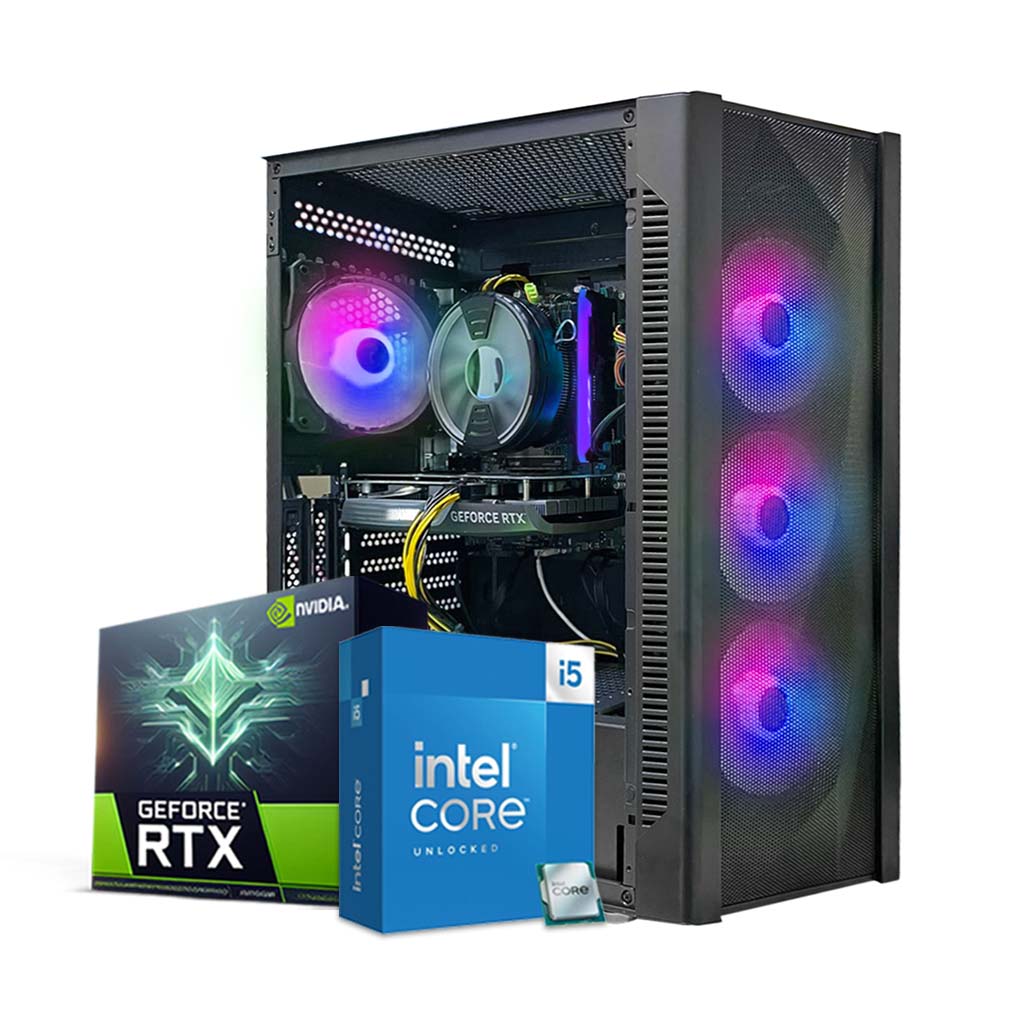
One of our best sellers is the Hyper Core 5060 Gaming PC, built to deliver maximum value for 1080p gaming. It features an Intel Core i5-14400F (10 cores, 16 threads) processor and an MSI GeForce RTX 5060 8GB GDDR7 GPU, a combo that handles gaming and streaming with ease. The system includes 16GB DDR4 RAM and a fast 1TB NVMe SSD, ensuring snappy Windows 11 performance and plenty of game storage. Despite its strong specs, this build is very affordable – priced around AED 2,999 on ArabGamers (after an 8% discount). At this price, you get a fully assembled, tuned, and Windows-activated gaming PC. The Hyper Core 5060 is ideal for esports titles (e.g., League of Legends, Valorant, PUBG) where it pushes high FPS, as well as AAA games at 1080p ultra. It’s also equipped with a quality 650W PSU and is housed in a sleek black case with RGB fans for a pro look. If you’re looking to buy an RTX 5060 gaming PC in UAE that offers the best bang for your buck, the Hyper Core 5060 is a top choice.
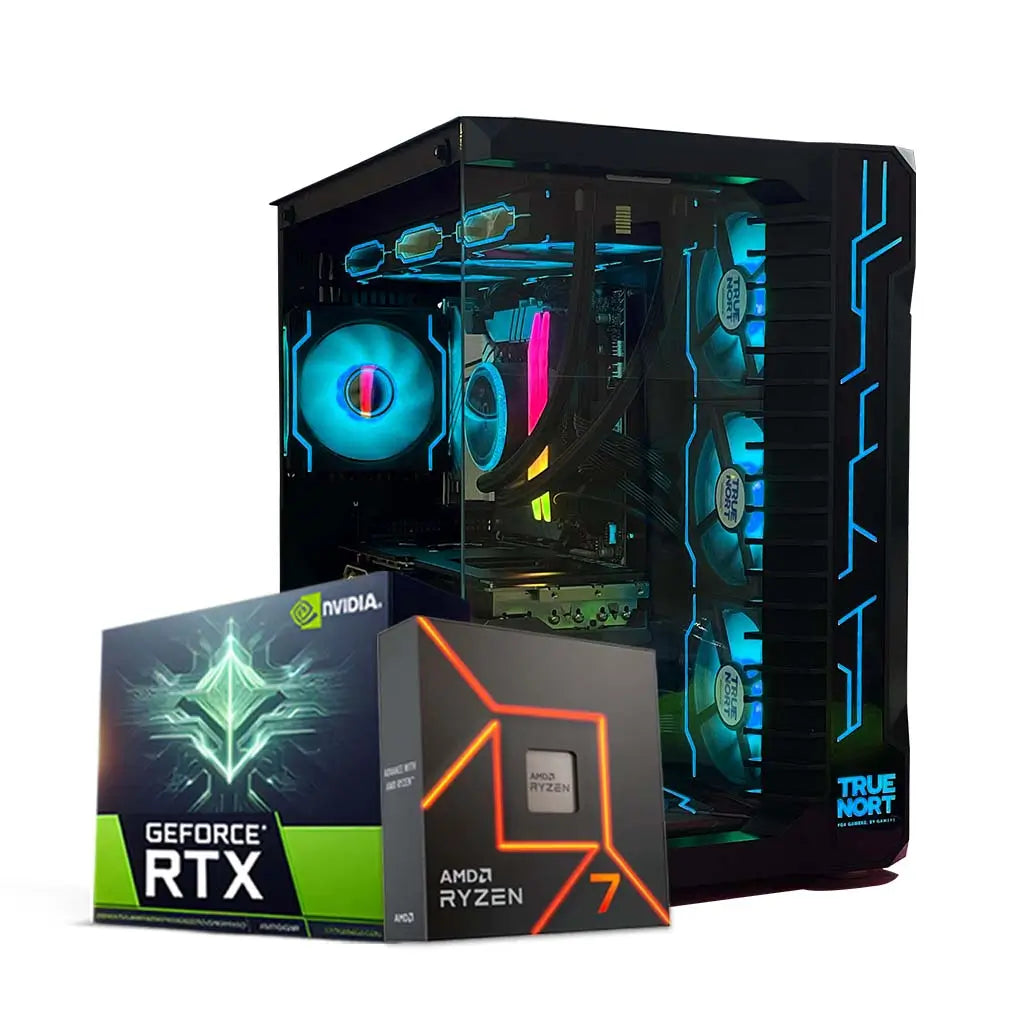
For gamers who want more multi-threaded power (or do creative work on the side), the StormX 5060 Gaming PC is a powerhouse. This rig pairs the RTX 5060 8GB GPU with an AMD Ryzen 7 7800X3D processor – one of the fastest gaming CPUs available, thanks to its 8 cores and special 3D V-Cache technology. The StormX comes with 32GB DDR5 RAM and a huge 2TB SSD, meaning it’s ready for heavy multitasking, content creation, and a massive game library. It also features a robust B650 motherboard and a 360mm liquid CPU cooler to keep temperatures in check. In gaming, this PC excels at high frame rates in CPU-intensive games and can easily drive 1440p 144Hz monitors when paired with the RTX 5060. It’s also perfect for streamers and creators in the UAE who need a reliable editing and rendering machine. The StormX 5060 is priced around AED 5,765 (slightly discounted from AED 5,945) – a reflection of its higher-end components. If you have the budget, this build showcases the RTX 5060 in its best light, ensuring no bottlenecks and offering an upgrade-friendly platform for the future. (Plus, it comes with premium touches like an 850W Gold PSU and Wi-Fi/Bluetooth connectivity out of the box.)
Both of the above PCs come with a 1-year warranty and fast delivery across UAE. ArabGamers also allows customization – you can upgrade the RAM, storage, or other parts when ordering to tailor the PC to your needs. For instance, you might opt for 32GB RAM in the Hyper Core, or add a secondary HDD for more storage. Our team can accommodate these changes.
Stepping up to an RTX 5060 Ti gaming PC, ArabGamers has configurations designed to maximize this GPU’s potential. Here’s a recommended build featuring the 5060 Ti:
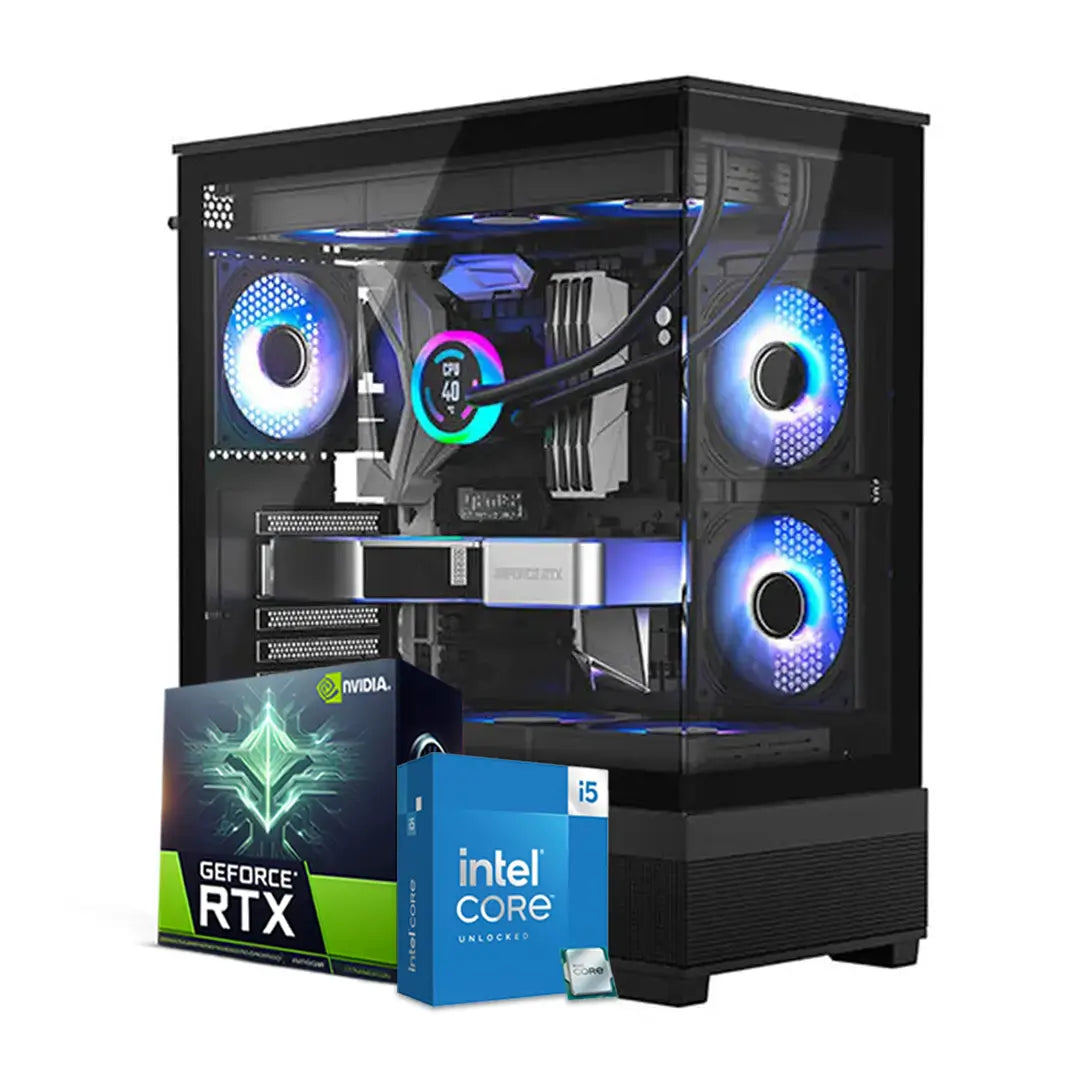
The Next-Gen 5060 Ti Gaming PC is a well-balanced mid-high-end system that pairs the Intel Core i5-14400F (10-core latest-gen CPU) with an RTX 5060 Ti 8GB graphics card. This combo ensures that neither the CPU nor GPU will hold the other back – great for achieving high FPS in both GPU-heavy and CPU-heavy games. The build includes 16GB of DDR4 RAM, a 1TB NVMe SSD, and a 240mm liquid cooling for the CPU to maintain boost clocks under load A quality 650W Thermaltake PSU and sleek RGB-lit case round out the packagePriced at about AED 4,459 (on sale from AED 4,999), the Next-Gen 5060 Ti PC is aimed at gamers who want an optimized 1440p machine without venturing into ultra-premium pricing. In real-world use, this PC will handle anything you throw at it: competitive shooters (where it will push high hundreds of FPS at 1080p), modern AAA games at 1440p ultra (usually 60-100+ FPS range, leveraging that RTX 5060 Ti power), and even entry-level streaming or recording. Should you wish, you can easily upgrade this rig down the line (it has additional RAM slots and storage bays free). But right out of the box, it’s a plug-and-play beast for high-performance gaming.
(If you desire an even more powerful setup, ArabGamers can build custom RTX 5060 Ti PCs with CPUs like the Intel Core i7-14700F or AMD Ryzen 9, and options for the 16GB RTX 5060 Ti. These would cater to high-end users who want maximum longevity. Feel free to reach out for a custom quote.)
All RTX 5060 Ti builds from ArabGamers.ae undergo rigorous testing to ensure stability at delivery. With the Next-Gen 5060 Ti PC or any custom variant, you’ll be ready for years of top-tier gaming, backed by warranty and after-sales support.
Prefer to build your own PC or upgrade an existing rig? ArabGamers.ae also offers GPU-only listings, so you can buy RTX 5060 Ti in UAE or the RTX 5060 card by itself and assemble a custom build. For DIY enthusiasts, here are some popular options:
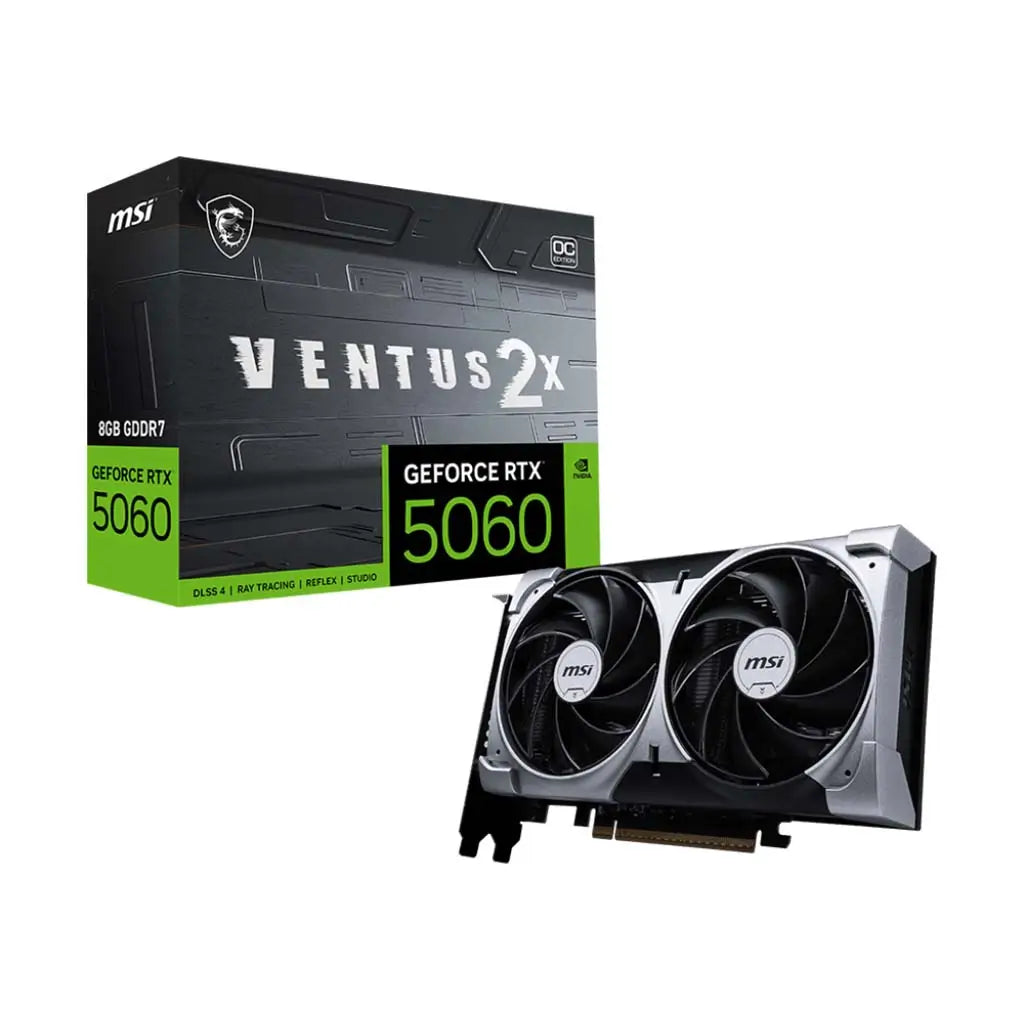
MSI GeForce RTX 5060 Ventus 2X 8GB OC – A dual-fan, compact design ideal for most cases. It’s priced around AED 1,525 and offers all the RTX 5060 performance in a cooler-running form factor. DIY builders love this card for its quiet operation and factory overclock. Simply drop it into a PCIe slot, ensure your PSU is ~550W or above (the card uses a single 8-pin power), and you’re good to go.
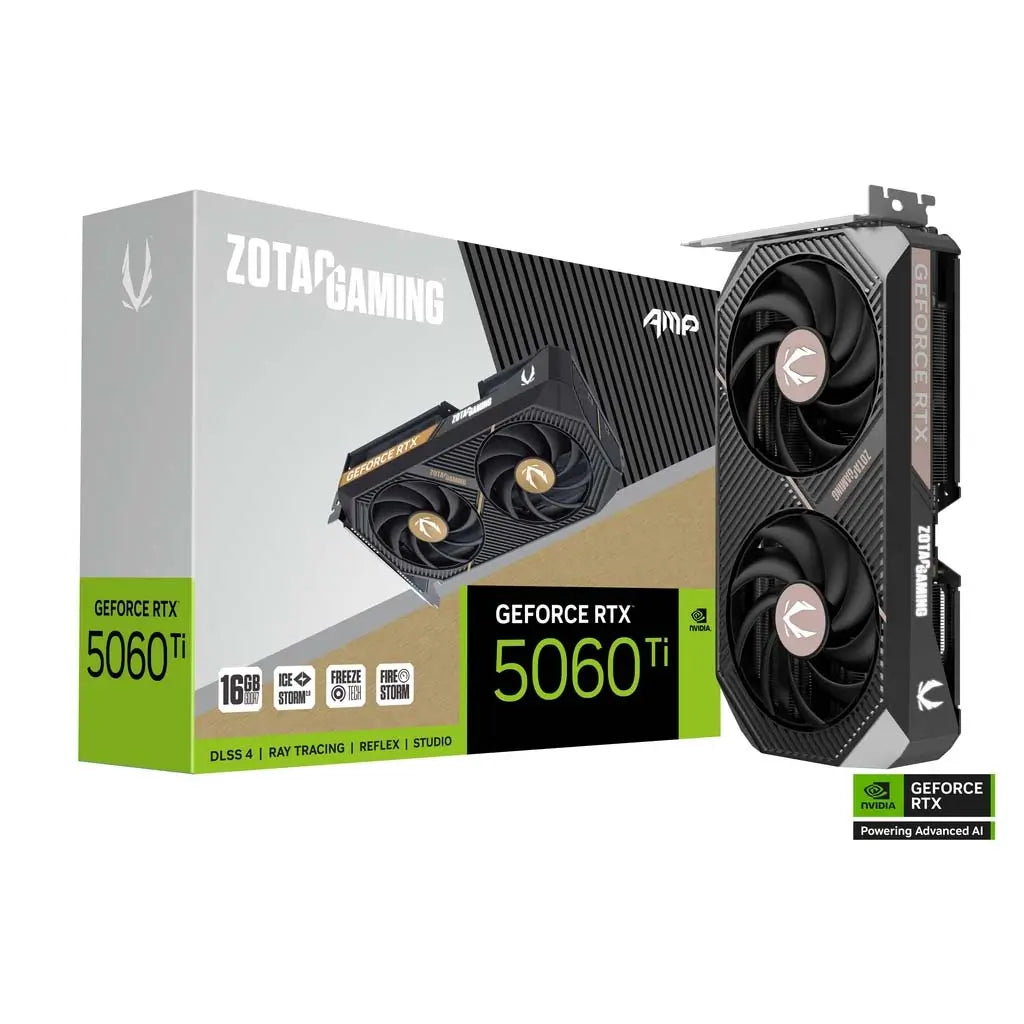
Zotac Gaming RTX 5060 Ti 8GB Twin Edge – A popular 5060 Ti card, featuring a dual-fan cooler and a relatively short length (great for smaller builds). This model has been seen for about AED 1,850–1,950 in the UAE market (prices can vary; for instance, one sale had it at AED 1,869 It delivers the full 5060 Ti experience and even a bit of headroom with its efficient cooling – many users report boost clocks staying high thanks to good thermals.
PNY / Palit RTX 5060 Ti 16GB – For those seeking the 16GB version, brands like Palit offer triple-fan cooled models. They typically cost ~AED 2,200-2,300 (e.g., Palit’s 16GB RTX 5060 Ti was listed at AED 2,259 on many sites. This is an excellent choice for a no-compromise build. Make sure your case can accommodate the card’s length and that you have an adequate PSU (recommended 600W+ for the 5060 Ti).
All these GPUs support the latest features out of the box. Also, NVIDIA’s driver support for the RTX 50-series has been stellar, with Game Ready drivers delivering optimizations for new games regularly. If you’re comfortable building a PC, getting a standalone RTX 5060 or 5060 Ti for sale in UAE and pairing it with a new Intel 14th-gen or AMD Ryzen 7000-series CPU can net you a very powerful custom rig. And if you need help picking parts, ArabGamers’ team is just a WhatsApp message away to advise on compatibility (PSU requirements, case fitment, etc.).
Both the RTX 5060 and RTX 5060 Ti are fantastic gaming GPUs that bring next-gen features to the mid-range segment. The RTX 5060 offers tremendous value – it’s efficient, runs cool, and crushes 1080p gaming without breaking the bank. On the other hand, the RTX 5060 Ti delivers a noticeable performance boost that appeals to gamers who want higher resolutions or just extra FPS headroom. It really comes down to budget vs performance: if you’re a part-time gamer or strictly sticking to 1080p, the RTX 5060 will serve you extremely well. For enthusiasts eyeing 1440p or wanting a more “premium” mid-range experience, the RTX 5060 Ti is worth the investment
Whichever you choose, rest assured you’re getting cutting-edge NVIDIA tech – from DLSS 4’s AI frame magic to gorgeous ray-traced visuals in supported games. Both cards support features like Reflex (for low latency in esports) and NVIDIA Broadcast (for AI-enhanced streaming and video calls), enhancing your overall experience beyond just raw FPS.
At the end of the day, your decision should align with your gaming needs and budget. We hope this guide has helped clarify the differences and ideal uses for the RTX 5060 vs 5060 Ti. If you’re ready to upgrade, ArabGamers.ae has you covered with curated PC builds and components at competitive UAE prices.
Call to Action: Still undecided or have questions? Let us help! Visit ArabGamers.ae to explore our range of RTX 5060 and RTX 5060 Ti gaming PCs, or reach out to our experts for personalized advice. You can WhatsApp us at +971 58 665 1195 for instant assistance in choosing the perfect rig or component. Get the best deals and buy your RTX 5060 / 5060 Ti in the UAE with confidence. Level up your gaming today with ArabGamers – where your ultimate gaming PC awaits!



Team Arab Gamers